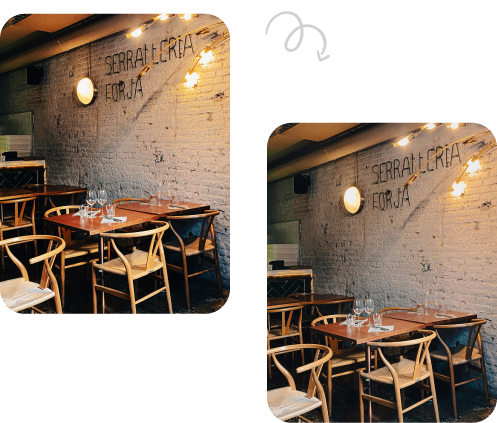


In the real estate world, visuals are everything. Before stepping into a property, most buyers form an impression online- and often, that impression is based on photos. While standard pictures do a decent job, panoramic photos take things to the next level. They allow buyers to explore wide, sweeping views of a room or an outdoor space, almost as if they are standing there in person. AI tools for Real Estate Panorama Photo Editing are a boon for many real estate businesses.
But here’s the catch: raw panoramic shots don’t always look as professional or eye-catching as they should. That’s where AI-powered photo editing tools come in. These tools are designed to enhance panoramic real estate images, making them sharper, brighter, and more appealing without requiring hours of manual editing.
Let’s explore why AI tools are becoming essential for real estate panorama photo editing, the benefits they offer, and some popular options available today.
Explore our Real Estate Panorama Photo Editing Services to boost your property listing.
Why Panoramic Photos Matter in Real Estate
Unlike single-frame shots, panoramic photos cover a wide angle, showcasing entire rooms or landscapes in one frame. This gives potential buyers a more immersive view of the property. Whether it’s a spacious living room, a backyard with a pool, or a rooftop with a cityscape, panoramas provide context that normal photos can’t.
However, panoramic photos can also suffer from issues like:
-
Distorted edges
-
Uneven lighting
-
Blurred details
-
Inconsistent colors
This is where AI-powered editing tools save the day.
How AI Enhances Real Estate Panorama Photos
AI has revolutionized photo editing by automating complex tasks that used to take hours. With real estate panoramas, AI tools can:
-
Correct Distortions – Panorama stitching often bends walls or floors unnaturally. AI can straighten lines and fix geometry issues.
-
Adjust Lighting and Exposure – AI enhances brightness and contrast to ensure every corner of the room looks well-lit.
-
Color Correction – It balances tones to make rooms look more natural and inviting.
-
Noise Reduction – Grainy or blurry areas are smoothed out for a cleaner look.
-
Sky Replacement – For outdoor panoramas, AI can replace dull skies with bright blue ones, instantly lifting the property’s appeal.
The result? Crisp, realistic, and professional panoramic photos that grab buyer attention instantly.
Benefits of Using AI for Panorama Photo Editing
1. Saves Time and Effort
Manual editing of panoramic photos is time-consuming and requires advanced skills. AI tools automate most of the process, freeing up agents and photographers to focus on selling properties rather than editing images for hours.
2. Consistency Across Listings
Buyers appreciate consistency when browsing multiple listings. AI ensures all photos, regardless of lighting conditions or camera quality, look uniform and professional.
3. Enhanced Buyer Experience
Panoramic photos edited with AI look polished, sharp, and immersive. This helps buyers imagine themselves in the space, which is critical in driving interest and faster decisions.
4. Cost-Effective
Hiring professional photo editors can be expensive. With AI tools, you can achieve near-professional results at a fraction of the cost.
5. Better Online Performance
High-quality images not only attract more clicks but also perform better on real estate websites and social media platforms. Enhanced panoramas increase engagement, which can lead to more inquiries and faster sales.
Read Also– Why Photo Enhancement is Important for Real Estate Photography
Popular AI Tools for Real Estate Panorama Photo Editing
Here are a few AI-powered tools that are making waves in real estate photo editing:
1. Adobe Photoshop with AI Features
Photoshop has integrated AI tools like “Neural Filters” that can enhance panoramas by adjusting lighting, smoothing details, and even replacing skies automatically.
2. Luminar Neo
Luminar uses AI for intelligent sky replacement, color correction, and noise reduction. Its AI engine works particularly well for outdoor panoramic shots.
3. Topaz Photo AI
This tool specializes in sharpening and upscaling images, which is perfect for large panoramic files. It ensures details stay crisp without losing quality.
4. Fotor AI Editor
A beginner-friendly tool that quickly adjusts brightness, removes noise, and balances colors. Great for real estate agents who want quick results without a steep learning curve.
5. Virtual Staging AI Tools
Some AI platforms not only enhance panoramas but also allow virtual staging. This means you can showcase a property with digital furniture in wide-angle or panoramic formats, making empty rooms look appealing.
Best Practices for Using AI in Panorama Editing
-
Don’t Overdo It: Enhancements should make photos look natural, not artificial.
-
Keep Colors True-to-Life: Buyers expect the property to look like the photos when they visit in person.
-
Test Multiple Tools: Different AI tools offer different strengths-try a few before committing.
-
Combine AI with Human Touch: AI is powerful, but a quick manual check ensures photos remain realistic and polished.
Final Thoughts
AI tools for real estate panorama photo editing are more than just a convenience-they’re becoming a necessity. With the real estate market moving online, high-quality visuals are the difference between a property that gets overlooked and one that gets sold.
By leveraging AI, real estate agents, photographers, and property owners can save time, cut costs, and deliver stunning panoramic photos that captivate buyers. In a world where first impressions are made in seconds, AI ensures your property listings always put their best face forward.
FAQs- AI Tools for Real Estate Panorama Photo Editing
Q1. Can AI tools replace professional photo editors for real estate panoramas?
AI tools are excellent for quick and consistent editing, but professional editors may still be needed for complex, custom edits. However, for most real estate needs, AI tools are more than sufficient.
Q2. Do AI photo editing tools work for both indoor and outdoor panoramas?
Yes. AI tools can enhance both indoor and outdoor panoramic shots by adjusting lighting, correcting distortions, and even replacing skies for exterior photos.
Q3. Are AI panorama editing tools expensive?
Not necessarily. Many AI tools offer affordable subscription plans, and some even have free versions with basic features. Compared to hiring professional editors, AI tools are usually much more cost-effective.
Q4. What are the best AI Tools for Real Estate Panorama Photo Editing?
Some of the best AI tools for real estate panorama photo editing are Adobe Photoshop (AI features), Luminar Neo, Topaz Photo AI, and Fotor AI Editor, as they offer quick enhancements, sky replacement, and distortion correction.