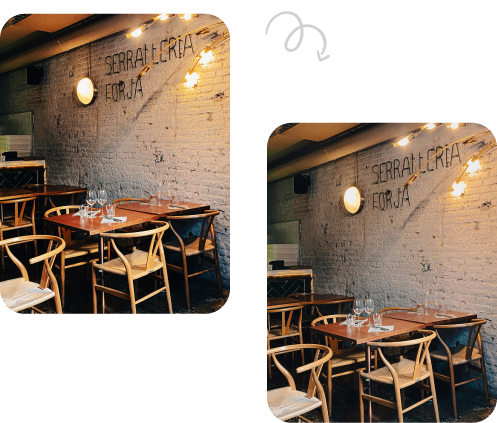

Walk into any competitive listing market today and you’ll notice something instantly: the homes that sell fastest are the ones that look brightest, sharpest, and most inviting online before a buyer ever steps through the door. That’s the quiet power of High Dynamic Range (HDR) editing. If you’ve ever wondered why some property photos feel flat while others practically glow with natural light, the answer usually comes down to software, not luck. This guide walks through the 10 best tools for HDR real estate photo editing, covering both do-it-yourself software and professional editing services, so real estate agents, developers, and colonizers can pick what actually fits their workflow.
Why HDR Editing Matters for Property Listings
Interior shots often have blown-out windows and shadowy corners because cameras can’t capture the full brightness range a human eye sees naturally. HDR editing solves this by blending multiple exposures into one balanced image, so window views, ceiling lights, and furniture all stay properly lit at once.
- Faster online engagement from buyers scrolling through listings
- More accurate representation of natural light and room depth
- Reduced harsh shadows and overexposed windows
- Consistent, professional look across an entire portfolio
10 Best Tools for HDR Real Estate Photo Editing
Below is a practical breakdown of software and services that photographers and agencies rely on in 2026. Some are hands-on programs you install yourself; others are done-for-you editing pipelines built specifically for listing photos.
1. Adobe Lightroom
Lightroom remains the industry default for a reason. It offers an intuitive all-in-one solution with solid HDR merge, lens corrections, and RAW support, and creates DNG files that work well for photographers already inside the Adobe ecosystem. Its cloud sync also makes it painless to edit a listing from a laptop and finish touch-ups on a tablet later.
2. Adobe Photoshop
Photoshop earns its spot when a single image needs more than automated merging can offer. Manual layer masking, sky swaps, and object removal give you full creative control, which matters most for hero shots used in print brochures or luxury listings.
3. Luminar Neo
Luminar Neo is an AI-powered photo editor built for professional-grade edits, particularly excelling in real estate photography through tools like Sky AI Replacement, Relight AI, and HDR Merge. It corrects lighting issues, removes unwanted objects, and even creates twilight-style shots, all while offering batch processing for handling large volumes of property photos. Many industry roundups now name it a top pick for realistic, natural-looking HDR results without the dated “over-processed” look.
4. Photomatix Pro 7
HDRsoft’s Photomatix Pro is considered the industry-standard HDR software for real estate photography, built on more than two decades of bracket-merging expertise. It’s known for powerful deghosting and realistic tone mapping, particularly suited to exteriors, with a one-time purchase model and reliable batch processing, though it does carry a steeper learning curve.
5. ON1 Photo RAW
ON1 Photo RAW is built for both HDR photography and general image editing, offering tools for merging multiple exposures into one HDR image while adjusting exposure and color balance. It’s a strong middle-ground option for agents who want RAW-level control without committing to a full Adobe subscription.
Read Also: Real Estate HDR Editing Tutorial
6. Imagen AI
For photographers processing hundreds of homes, Imagen’s cloud-based AI editing and real estate-specific tools like Sky Replacement offer unmatched consistency and speed. Rather than local processing tying up your computer, cloud processing lets you keep shooting or managing business while edits happen in the background. It’s a smart fit for high-volume brokerages juggling dozens of active listings weekly.
7. Snapseed
Snapseed is a free mobile app that lets users combine multiple exposures of the same scene into a single image, capturing more shadow and highlight detail than any single exposure could on its own. For agents shooting quick phone photos between showings, it’s a genuinely useful backup tool.
8. BoxBrownie
Among real estate HDR photo editing services, BoxBrownie stands out for volume and reliability. Their process starts with capturing a shot at several exposure levels, from brightest to darkest, then blending those exposures to produce a balanced image showing detail across the entire frame without dark or blown-out patches. The platform is particularly popular with agents shooting RAW HDR brackets who want polished results without touching editing software themselves.
9. PhotoUp
PhotoUp provides end-to-end real estate photo editing and marketing solutions through a dashboard built for professionals managing multiple listings at once. It runs on a credit-based subscription model and blends both human editors and AI tools, giving agencies flexibility on turnaround time and cost.
10. ON1 / HDR Efex-Style Plugins and Aurora HDR
Aurora HDR is a premium photographic tool that enhances images by turning them into polished, high-quality HDR results. Plugin-based tools like this slot directly into Lightroom or Photoshop, giving photographers a dedicated HDR pass without abandoning their existing workflow, which rounds out this list of the 10 best tools for HDR real estate photo editing nicely for hybrid users.
Read Also: Real Estate HDR Photo Editing Tips
Software vs. Outsourced Editing Services: Which Fits You?
Real estate agents wearing five hats already don’t always have time to learn tone-mapping curves. Developers and colonizers managing large project launches, on the other hand, often need dozens of units edited on a strict timeline.
- Choose software if you shoot regularly, want creative control, and don’t mind a learning curve.
- Choose a service if you need consistent, listing-ready photos delivered on a schedule without touching a single slider.
- Mix both for hero shots edited in-house and bulk interiors sent out for turnaround.
What to Look for Before You Commit
Not every HDR tool suits every property type. Before subscribing to software or signing with an editing vendor, weigh these factors carefully against your actual monthly shooting volume.
- Turnaround time, especially during peak listing seasons
- Batch processing capability for high-volume portfolios
- Natural-looking output rather than an artificial, over-saturated finish
- Pricing structure: per-image, subscription, or credit-based
- Compatibility with your existing camera brackets and file formats
Conclusion
There’s no single “correct” answer among the 10 best tools for HDR real estate photo editing covered here, because the right pick depends entirely on your volume, budget, and appetite for hands-on editing. A solo agent shooting a few listings a month might thrive with Lightroom and Snapseed alone, while a busy development firm launching new units weekly may lean on Imagen AI or BoxBrownie for consistency at scale. Whatever you choose, the goal stays the same: photos that make buyers stop scrolling and start imagining themselves in the space.
Frequently Asked Questions
1. What is HDR real estate photo editing?
HDR editing blends several exposures of the same shot, usually a dark, medium, and bright version, into one image that balances shadows and highlights naturally, without harsh contrast or blown-out windows.
2. Do I need professional software, or can I edit HDR photos on my phone?
Mobile apps like Snapseed handle basic HDR merging well for casual listings, but high-volume agents and developers typically get better, more consistent results from dedicated software or professional editing services.
3. How much do real estate HDR photo editing services typically cost?
Pricing varies widely by provider and volume, ranging from roughly fifty cents to a few dollars per image, with subscription or credit-based plans often working out cheaper for agents editing dozens of photos monthly.
4. Is HDR editing the same as virtual staging?
No. HDR editing corrects lighting and exposure in real photos, while virtual staging digitally adds furniture and decor to empty rooms. Many providers, like BoxBrownie and PhotoUp, offer both as separate services.
5. Can HDR editing make a listing look unrealistic or misleading?
It can, if overdone. The current industry trend favors natural, true-to-life results over dramatic, heavily tone-mapped images, since buyers expect what they see online to match what they find in person.